
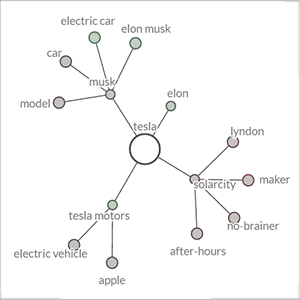
Keyword Graph – Semantic Associations
The keyword graph shows the search term together with its strongest associations within the search results. The resulting semantic network is a powerful tool to guide the development and ongoing adaptation of an organization’s communication strategies. The keyword graph allows investigating how different stakeholder groups perceive brands or products, what negative and positive associations they have with a topic (the color of data points encodes their sentiment), and how the meaning of specific terms changes over time.
Semantic Associations
The computation of associations considers the selected source(s) and time interval, and whether the topic comparison or sentiment mode is active. Changing any of these settings, therefore, triggers an immediate update of the graph (which can also be enlarged to full screen size).
Keyword Graph Controls
Additional options to manipulate the graph include:
- Single clicking on a child node extends the graph with up to eight new nodes. The ‘+’ symbol in the upper right corner triggers this process for each of the displayed child nodes, thereby showing the next hierarchical level in its entirety.
- Single clicking on a parent node deletes all its child nodes, which allows filtering out unwanted sub-trees.
- Double clicking on any of the displayed nodes triggers a search for the keyword.
- ‘Edges’ refers to the number of connections to be considered when adding new elements to the graph. The default value is five, which can be increased up to a maximum of eight connections.
- Clicking on the central term (= root node) resets the diagram.
- The ‘pause’ button freezes the display, allowing the analyst to manually re-arrange the position of nodes via drag and drop operations.


