

Advanced Search Engine
The advanced search at the heart of the webLyzard platform unlocks the full potential of data and content ecosystems. Its capabilities go far beyond simple keyword matching, instead offering a comprehensive approach to discovering, retrieving and analyzing data.
The advanced search helps you generate insights, disambiguate queries and uncover hidden relations within large datasets. Furthermore, it serves as a key enabler of our visual analytics dashboard, enterprise search applications, and AI-driven data and annotation services, the advanced search engine empowers data-driven decisions with unprecedented speed and accuracy. Whether you conduct complex queries, visualize trends, or automate data-intensive processes, our platform’s advanced search provides the foundation for transforming raw information into actionable intelligence.
Main Search Dialog
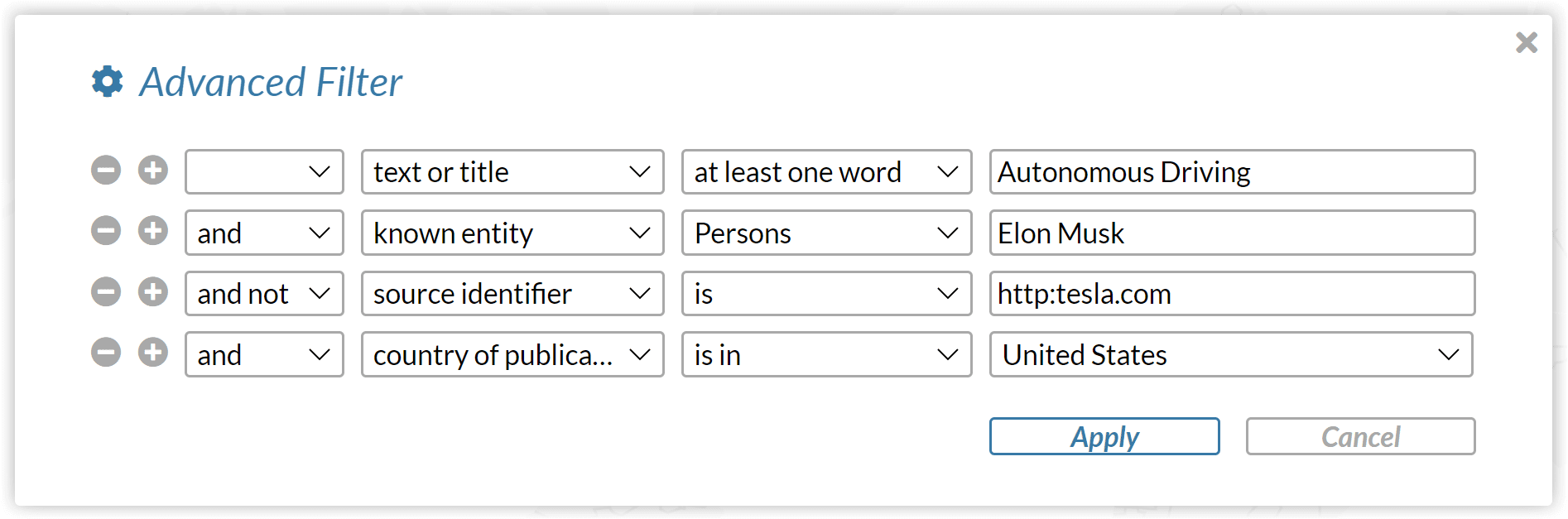
The advanced search dialog of the webLyzard dashboard provides a clear and structured way to build complex queries. It includes logical operators and filters for metadata elements such as source, sentiment, location, etc. You can access these settings through the gear icons of bookmarks or the currently active global filter. As shown in the screenshot below, the plus and minus symbols adjust the number of restrictions, disregarding empty fields. The advanced search supports three logical operators: ‘and’, ‘or’, ‘and not’, including the option to use brackets to combine these operators as part of nested constructs. Please note that ‘and’ combinations will always take precedence over ‘or’, which can be changed by applying brackets.
Advanced Search Attributes
The logical operators of the advanced search can be applied to a range of content features and metadata elements.
Content and Source Selection
- Text / Title / Text or Title. Specifies in which parts of a document to search. You can restrict the full text search to matches co-occurring within the same sentence. The topic management section contains additional information on the various options to define a query.
- Source Identifier. Restricts the search to certain social media accounts or Web domains, using platform-specific prefixes such as bluesky:cnn, http:cnn.com, etc. (note the difference in spelling of a source identifier such as http:ibm.com and a URL http://www.ibm.com).
- Uniform Resource Locator (URL). Restricts the results set to documents that include the specified pattern in their URL. We recommend to use the “Source Identifier” (see above) and not the URL pattern when targeting entire domains such as bbc.co.uk.
- Length of Text. Document of a certain length in terms of word count, character count or number of sentences contained.
- Content Source / Content Language. Narrows the advanced search to one of the available data sources (news, government websites, social media, etc.) or specific languages. These settings are part of the header menu, but can be useful for nested queries with brackets – e.g., including all news articles but requiring a minimum reach value for Bluesky postings.
Metadata Attributes
- Country of Publication. Contains a drop down selector for restricting the search to documents published in certain countries.
- Target Location. Advanced Search for locations mentioned in documents, which can include the names of cities, states and countries.
- Document Keywords. Documents with specific keyword annotations (this feature differs from the full text search, as only up to ten keywords are being annotated for any given document).
- Named Entities. Documents that mention specific people (e.g. “Elon Musk”), organizations (e.g. “Tesla, Inc.”) or locations (e.g., “San Carlos, US”).
- Sentiment. Documents classified as either “positive”, “negative” or “neutral”.
- Reach. Restricts the search to sources with a certain level of authority, normalized in a zero to one interval (measured in terms of average traffic statistics in the case of Websites, for example, or a metric ratio of followers and followed accounts in the case of Bluesky).
Advanced Search Features to Support the Editing Process
List Editor. The options “list of phrases” for text elements and “is (list)” for other attributes provide access to a multi-line editor that facilitates the definition of queries that require a list of attributes is required, for example a set of ten source identifiers. Working together with our strategic partner Storypact, the upcoming March 2025 release will feature an AI-driven extension of the list editor.
Autocomplete. For some of the fields, for example known entities, the advanced search provides an autocomplete function. Entering text in a search bar triggers a drop-down menu with matching suggestions retrieved from the entire document repository. This feedback is useful to check whether a match exists before running the actual query.